
Apple’s new containerization feature – what it is, how it differs from Docker, and when to choose it
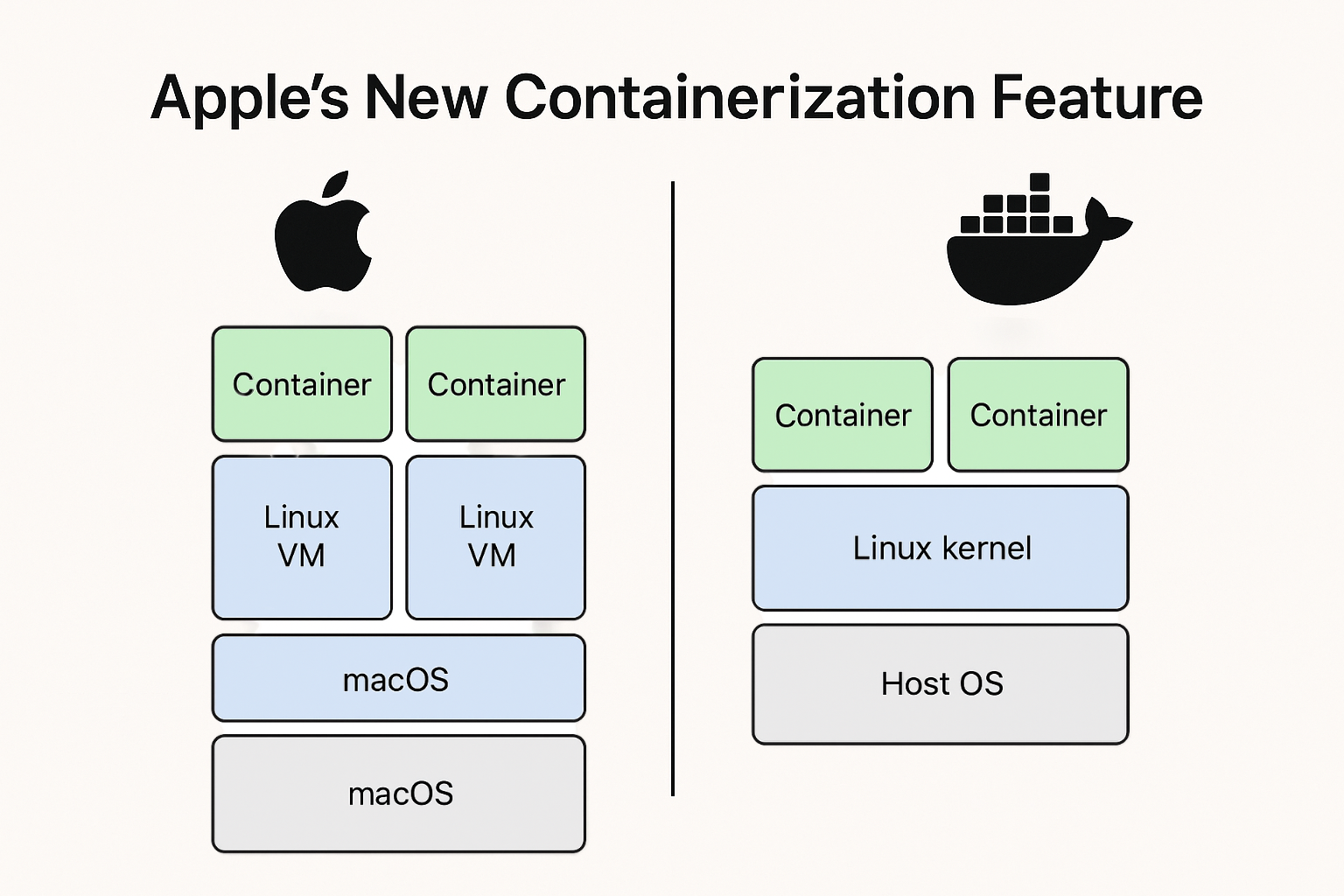
Version note — July 15, 2026: This article describes Apple's
containerproject as it exists on macOS 26 and the current pre-1.0 release line. The project is evolving and has introduced breaking CLI and API changes. Check the official releases and technical overview before relying on a command or capability.
Short version: Apple announced a native containerization stack for macOS that runs OCI images inside lightweight Linux virtual machines (VMs) using macOS virtualization APIs. It is built to be tightly integrated with macOS and Apple Silicon, and it is not a drop-in replacement for Docker in every environment – but for many Mac-first workflows, it’s a serious new option.
What Apple actually released
Apple introduced an open-source “container” tool and a Containerization framework for macOS that can create and run OCI-compatible Linux container images on Macs. The implementation is written in Swift and leverages macOS’s virtualization framework so that each container runs inside a lightweight Linux VM rather than sharing the macOS kernel directly. The repo and docs live on Apple’s GitHub.
Technical difference – Apple’s approach versus a typical Docker approach
1) Kernel model
- Docker (typical Linux containers): containers share the host kernel. Containers are lightweight because they reuse the kernel – isolation is achieved via namespaces, control groups (cgroups), seccomp, AppArmor, SELinux, etc.
- Apple Container: runs each Linux container inside its own lightweight VM that has its own Linux kernel. That means kernel-level isolation between containers and between container and host.
2) Runtime and plumbing
- Docker: relies on container runtimes (runc/containerd) and a daemon (dockerd). On macOS, Docker Desktop historically used a small Linux VM hypervisor layer (HyperKit, qemu, etc.) to host the Linux kernel and then ran containers inside that VM – this was effectively Docker adding a shim on top of macOS because macOS is not a Linux kernel.
- Apple Container: replaces that shim with a first-party macOS-native implementation that uses Virtualization.framework, vmnet, Keychain and other macOS services directly. It presents an OCI-compatible image surface but implements execution using macOS virtualization APIs rather than a third-party VM + Docker engine stack.
3) Integration and ecosystem
- Docker: broad cross-platform ecosystem, mature CLI, Compose, Kubernetes integrations, swarm and third-party tooling. Works identically across Linux hosts and Docker Desktop on macOS/Windows (though on macOS/Windows it still needs a Linux VM under the hood).
- Apple Container: aims to be OCI-compatible (so images and registries are compatible), but the tool is deeply integrated with macOS features (Keychain for secrets, XPC for IPC, vmnet for networking), making it first-class on macOS but macOS-specific in behaviour.
Pros of Apple’s approach
- Stronger isolation at the kernel level – each container gets its own kernel, which reduces risk from kernel exploits and lateral movement between containers. This is similar philosophically to Kata Containers and Firecracker, but native to macOS.
- Native macOS integration – tools can plug into Keychain, vmnet, XPC and other macOS services in a straightforward way, improving secrets management and IPC semantics for macOS-native developer workflows.
- Designed for Apple Silicon – Apple’s Virtualization framework and M-series chips provide a first-party path for running the lightweight VMs. Performance should be measured against the actual alternative and workload rather than assumed from the implementation.
- OCI compatibility – you can pull and run standard OCI images, so registries and container images remain usable. That lowers friction for devs who already use container images.
- A different isolation boundary – a VM per container can reduce some shared-kernel risks. It does not make arbitrary untrusted code safe; mounts, credentials, networking, host integrations, and project maturity remain part of the threat model.
Cons and tradeoffs
- Higher per-container resource overhead – a separate lightweight VM per container usually costs more memory and some CPU compared to kernel-sharing containers. The gap may be small on Apple Silicon, but it exists in principle. Some virtualization features (like dynamic memory ballooning) are limited, which affects scaling and memory efficiency.
- Maturity and ecosystem gaps – Docker, containerd and Kubernetes have years of ecosystem work, plugins, debugging tools, monitoring integrations and community knowledge. Apple’s stack is new; some edge cases, networking behaviours and tooling gaps remain to be ironed out.
- Possible macOS lock-in – because Apple uses macOS-specific services and virtualization features, certain integrations or workflows might not behave identically off-Mac. While OCI images remain portable, operational behaviours and tooling may diverge.
- Networking and multi-container communication caveats – early reports note container-to-container networking or advanced networking features are still evolving; if your workflow relies on complicated overlay networks or cross-host service meshes, expect extra work.
- Not a replacement for Linux servers – server fleets and production Kubernetes clusters run on Linux. Apple’s macOS containerization solves Mac-local developer experience and secure local execution, not replacing server-side container runtimes.
When to choose Apple’s container approach over Docker (practical guidance)
Choose Apple Container on your Mac when you care about one or more of the following:
- You want a VM-per-container isolation model and have assessed the host data, credentials, and network access the workload will receive.
- You want first-party support on Apple Silicon with direct integration into macOS frameworks.
- You are a macOS-native developer or team and desire a native, Apple-supported workflow for running OCI images locally without Docker Desktop.
- You need to run Linux tools on macOS but prefer using Apple’s system management for networking, credentials, and UI integration.
Stick with Docker when:
- Your target environment is Linux servers, cloud VMs or Kubernetes; Docker/containerd/K8s behaviors on Linux are the canonical production environment.
- You rely on mature Docker ecosystem features – Compose, Swarm, third-party plugins, and established CI/CD integrations.
- You need very fine-grained resource efficiency per-container for large numbers of small containers where shared-kernel efficiency matters.
Migration and coexistence strategy – a practical blueprint
- Start local with Apple Container for development testing – use Apple’s tool for macOS-first development, but validate images on Linux CI runners or staging to catch platform differences.
- Keep CI/CD and production on Linux tooling – build and push OCI images from either tool, but run integration tests on Linux hosts or Linux-based runners that match production.
- Test networking and volume semantics – run your app’s multi-container stack and confirm network behaviour, service discovery and volume persistence match expectations; rewrite any host-dependent scripts.
- Measure resource usage – if many small containers are needed, benchmark memory and startup times and compare to a Docker-on-Linux baseline.
- Threat-model sensitive local runs – use the VM boundary deliberately, mount only required data, scope credentials, and verify whether the tool's current limitations fit the workload.
Example starting point (where to look)
Apple’s open-source repo and docs are the primary source to get hands-on – the CLI is designed to consume and produce OCI images, and the repo includes usage docs and examples. Start with Apple’s container GitHub and Apple’s developer announcement for the exact commands and APIs.
Final verdict – when Apple’s container approach wins
For Mac-first development and tight macOS integration, Apple’s containerization is an interesting option. It provides a first-party implementation for Apple Silicon and macOS plumbing. However, it does not obviate Docker or containerd in production Linux environments; portability, ecosystem maturity, and server-side performance still favour the established Linux runtime stack.
If I had to pick one plain rule: evaluate Apple Container for a Mac developer workflow, benchmark it against the tools you already use, and continue to validate production images in the Linux environment where they will run.
And as always, StayFrosty!
~ James